Know your real number before you text the price.
Apps help you send a price faster. This works out what the price should be first. Six numbers you already know, about a minute, and it all stays on your phone.
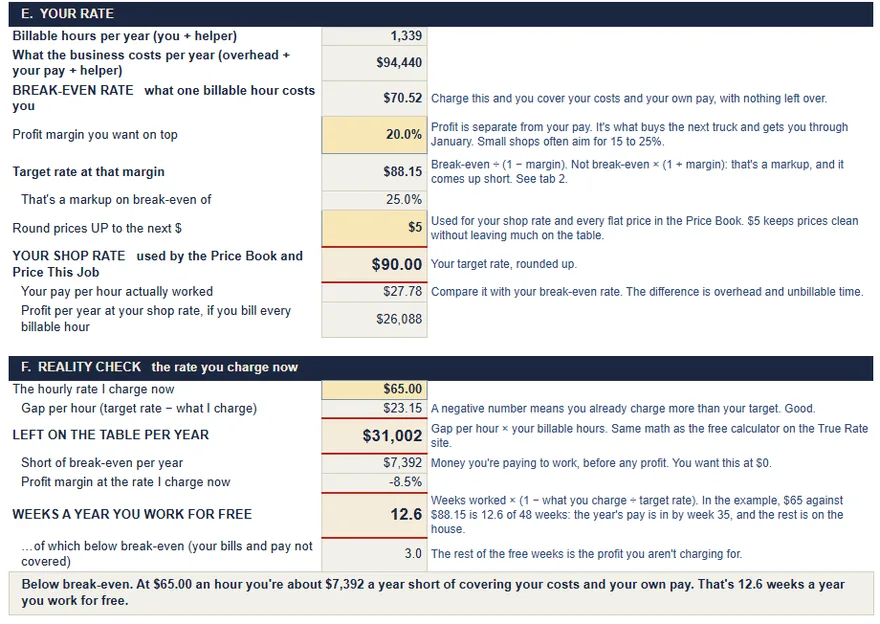
You work 12.6 weeks a year for free.
At $65 an hour, a full year of work brings in what 35.4 weeks should at $88.15. 3.0 of the missing weeks are your own bills and pay. The other 9.6 are the profit. Right now the truck gets paid before you do.
- Paid 35.4 weeks
- Bills and pay not covered 3.0 weeks
- Profit not charged 9.6 weeks
"For free" is measured against your target rate, which is your costs, your pay and the profit you set. It's an estimate from the numbers you typed, not financial or tax advice.
Raise your rate to $90.
This isn't a talking-to. Nobody hands a one-man shop these numbers. At $65 an hour you're under your own break-even of $70.52, so before profit even comes into it, the business and your own pay aren't covered. One number fixes that.
- Every hour you bill38% up from $65
- $25more an hour
- Over the 1,339 hours a year customers pay forif the same hours stay booked
- $33,480more a year
$90 is your target rounded up to the next $5, the way the kit sets a shop rate. New customers start at the new rate.
This one isn't from the kit. Get Paid Texts has no rate-change text, so it was written here in the same voice. Fill in the brackets before you send it.
Before you text the price
Price a job
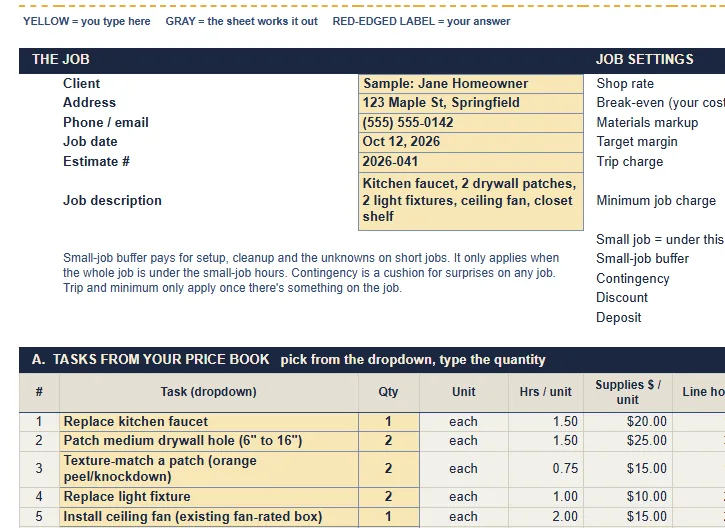
Priced at your $90 shop rate. Pick the job, check the hours, add the parts. Doing more than one job on the same visit? Add each one. The trip, the minimum and the small-job buffer get charged once, the way the kit prices a ticket.
The sample is a kitchen faucet. Type your job.
Price to text
$230
- Replace kitchen faucet1.5 h at $90$160
- Small-job buffer, under 4 h$24
- Trip charge, once a visit$35
- Contingency, 5%$11
- Price to text$230
Covers your bills and your pay, with 45.2% profit on top. Your target is 20%.
Recent prices on this phone
Trip $35, a 15% buffer on visits under 4 hours, 5% contingency and a $195 minimum are the kit's starting settings. In the kit you set your own. Your rate and costs never go in the text.
Your numbers, on one card.
Screenshot it. Keep it on your lock screen or clipped to the visor, so the number's there when the customer asks "what do you charge?"
The three rates come from your six numbers. The rest are the kit's starter settings for every job. In the kit you set your own.
 My numbers
I price jobs from
$90an hour
- Break-even
- $70.52
- Target, 20% profit
- $88.15
- Paid hours a year
- 1,339
On every job
- Minimum
- $195
- Trip charge
- $35
- Deposit
- 30%
- Jobs under 4 h
- +15%
- Parts
- +25%
Below target
It covered you, barely. Your time earned $75.94 an hour against a $70.52 break-even, a 5.1% margin. To make your 20% on those real numbers it needed $4,035: $635 more.
The kit prices every job like this.
The price-a-job tool above is one line of the kit's Price This Job sheet. The kit is a spreadsheet you own. Fill in My Numbers once and everything else prices off it.
It's Google Sheets or Excel, and it runs in the free Google Sheets phone app, so you can price the job in the driveway. One-time $39. No subscription, no login.
- 1
My Numbers
Your break-even, target and shop rate, from your truck, insurance, phone, tools, pay and the hours you can bill.
- 2
Markup and margin
Type the margin you want and it gives you the markup you need. A 30% markup is only a 23% margin, and the sheet keeps the two straight.
- 3
Price Book: 80 jobs
Starter hours, a typical range and a flat price from your rate. Change the hours to how long they take you. Add your own.
- 4
Price This Job
Tasks, materials and subs on one ticket, with the trip charge, the minimum and the small-job buffer. The margin box goes red if the price doesn't cover you.
- 5
Was I Right?
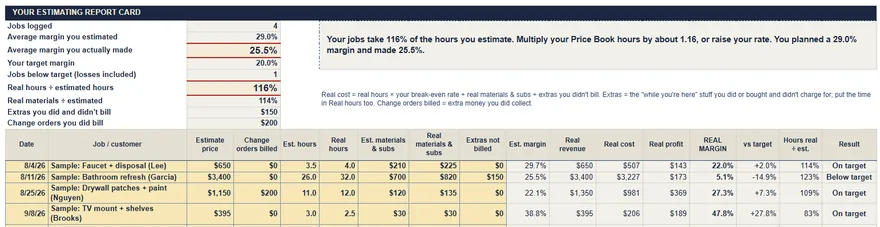
Your estimate next to what the job actually took. After a few jobs you'll see which tasks you under-bid, and by how much.
- 6
Client estimate
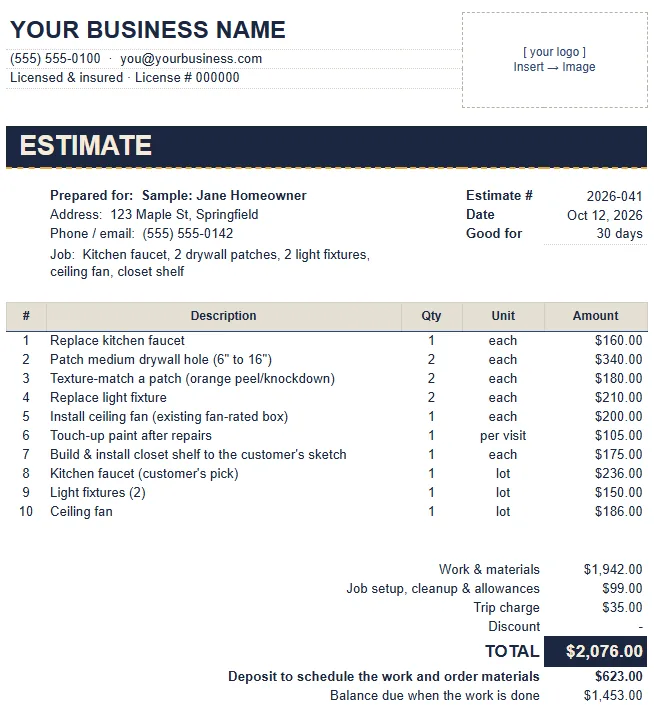
A clean estimate to print or send as a PDF. It shows the customer a price, not your math.
- +
Get Paid Texts
Copy-paste wording for change orders, deposits and final-payment reminders. These are templates, not legal advice, and the rules vary by state.
What's in the download
These are the kit's own tabs, filled in with the same worked example as the calculator above. Yours fill in from your numbers.
- The kit
- True-Rate-Price-This-Job.xlsx, 131 KB, seven tabs. It opens in Excel or Numbers. On your phone, use the one-click Google Sheets "make a copy" link instead.
- Get Paid Texts
- A page of wording for change orders, deposits and final-payment reminders. Copy it into your phone's text replacements.
- Quick-start guide
- Every tab in the order you'll use it, plus a 3-minute first run on the download page.
The Going Rate doesn't pay your truck.
"What the other guy charges" is the number everybody uses and nobody figured. He doesn't know his costs either, and he doesn't pay your truck payment.
What contractors say online. Phrases from public forums, lightly edited. These aren't customers or testimonials.
Pulling numbers out of my behind.
6 years in and still under-bidding.
Made 8% on a job I thought was 25%.
Built with a working general contractor, from the way real small jobs get priced, texted and paid.
Get the kit
$39One time. The file is yours.
- My Numbers: your break-even and shop rate
- Price Book of 80 flat-rate jobs
- Price This Job with trip and minimum charges
- Markup and margin converter
- Was I Right? estimate-vs-actual log
- Client estimate
- Bonus: Get Paid Texts
- Pay on Stripe's checkout page. Stripe handles the card. We never see the number.
- You land on your download page. Make your Google Sheets copy or download the Excel file right there, on the phone you paid with.
- Do the 3-minute first run. Your numbers from this site go into tab 1, then you price one real job.
If it's no use to you, email us within 14 days and you get the full $39 back. True Rate is made by FantasyLab, and the person who built it answers the support email.
Running a crew with scheduling and dispatch? Field-service software may fit you better. The comparison lays out the trade-offs.
Straight answers
Does anything I type get sent anywhere?
No. The math runs on your phone. Your numbers are saved only in this browser so they're there next time, and "Start over with the sample numbers" clears them. The price text goes nowhere until you paste it.
Google Sheets or Excel?
Both. You get an .xlsx file for Excel and a one-click "make a copy" link for Google Sheets. Google Sheets is free and runs in the phone app, so that's the one to use if you price jobs on site.
Are the price book's prices "right" for my area?
Every task is priced from the rate you set, and you can change any task's hours. Each one shows a typical range so you can sanity-check your edits. It's a starting list, not a market survey. You know your area better than a spreadsheet does.
Is it specific to my state?
No. It works from your costs, your pay goal and your hours, so it fits anywhere. Sales tax, licensing and contract rules vary by state and city. The kit doesn't handle those for you.
What happens after I pay?
Stripe sends you straight to your download page, with the Google Sheets copy link, the Excel file, Get Paid Texts and the quick-start guide. It works on a phone. Stripe also emails a receipt to the address you paid with.
What if I lose the download or get a new phone?
Your Google Sheets copy lives in your Google Drive, so a new phone just signs in and it's there. The download page remembers your order on the device you bought on for 30 days, and it has an "Email me this link" button. After that, email us from the address you paid with and we'll send the files again.
What if it's not for me?
Email us within 14 days of purchase for a full refund. Support: our support inbox.
I already use Jobber or Housecall Pro. Do I need this?
Maybe not. Those tools handle scheduling, invoicing and payments. True Rate is for working out the right number in the first place. You can set your rate here and then put it into your software. See the comparison.
Is this accounting, tax or legal advice?
No. It's a pricing tool and a set of templates. It doesn't replace a bookkeeper, accountant or attorney, and it doesn't guarantee any result.